Menu

How To Run Android Apps On Windows

Now you can run all of the famous Android Apps on your Windows PC. This is the easiest Tutorial to all those who wants to test the apps without wasting their time.

To run Android applications on windows xp,vista or windows 7,all you need is a small android emulator which you have to install on your pc.
                      http://techwarlock.blogspot.in/
There are lots of android emulator exists in market but we are using one of the well known "Blue stack BETA". the earlier version is "Blue Stack Alpha" which is  only compatible with  Windows 7 PC’s and Windows 8. Best part of new beta edition is basically converting the ARM compatible Android apps to run on x86 platform and that too with a great efficiency. Or simply it means Now the software is compatible with Vista and windows7 and Windows XP also. In new Blue stack BETA Users can download applications from GetJar, 1Mobile, and Amazon and test them on windows machine. So apps will be downloaded by the software and install with in it.

After downloading install this on your windows machine and then signup by using your facebook or bluestack account. After login download android applications and run them on your windows machine..:)
Read more ...

Compile And Run Java Programs On Android Phone

AIDE is an Free integrated development environment for developing real Android Apps directly on Android devices.Means You Can Easily Compile And Run Java Programs On Android Phone.AIDE is More Than A Text Editor offering advanced features like code completion, real-time error checking, re-factoring and smart code navigation, and Also It runs your App with a single click.AIDE supports almost all features of Eclipse,So when You start Writing Code In AIDE text Editor You will Surly feel a Real Compiler Environment.
                               http://techwarlock.blogspot.in/2012/07/compile-and-run-java-programs-on-your.html
Some Features Of AIDE that Makes It Different...

  • Create And Run Applications In Single Click
  • No root access required
  • Fast Compilation
  • Uses Eclipse .classpath project format for compatibility
  • Integrated Log Cat viewer
  • Real time error analysis throughout the whole project
  • Automatic Fixes for many errors Just Like Net-beans
  • Code for-matter
  • Code completion for Java and Android XML
  • Syntax highlighting for Java and XML
  • Unlimited Undo/Redo
  • Keyboard support with configurable key bindings
  • Dropbox integration

If You Want To Turn Your Mobile In To A Real Programming Machine Then Download AIDE and Enjoy..
You Can Download AIDE by Google Play By Searching AIDE in Search Bar.
After Installation Its Easy To Use..

If You Are A Java Developer And You Have Android Phone In Your Pocket..then It Is A must Try Application For You to Compile and Run Java Programs On Your Phone
Read more ...

How To Compile And Run C/C++ Programs On Android

Before The Official Launch of Android Phones In India,Somebody Said me that "Android Phones Are The Future of Mobile Phone Computing..They Will Take Mobile Computing To New Heights...".

Google play(Android market) also plays a important role to provide them the capability to act like Super Computer. :)

If you are using android smart phone then you Probably know that what Crucial tasks a simple android phone can perform And Everything is just because of Google Play. :)
Now a days Developer are busy in developing system applications for android to provide it functionality like a Computer. One Of the Handy Android System Application Is C4droid.

First Of All What Is C4droid..?


C4droid is a C/C++ compiler for Android.
C4droid already has almost full C language support.
                                   http://techwarlock.blogspot.in/2012/07/know-how-to-compile-and-run-cc-programs.html
Now You write your own applications on Android phone, and run them. This app uses TCC and uClibc, so it has full support of ANSI C and some support of ISO C99.

So lets Start..
1). First Of All Go To Google Play And Search For A Application Named "C4droid".

2). Download That Application And Install It On Your Android Phone.

3). Open C4droid. Now A Text Editor Will Appear In Front Of You..Write your C or C++ Code There.

4). After That You Can Able To Compile Or Run Your Code in it.. :)

Done!!!

C4droid Have also Many More Features Like Syntax highlighting,Compiler Selection
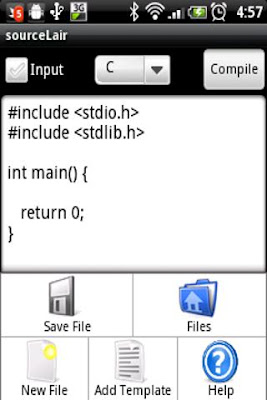
You Can Also Able To Supply Arguments For Your Program By just Leaving A blank Space Between Two Arguments.If you Don't Like C4droid then SouceLair Is another alternative to this.

You Can Download Source Lair By Searching "SourceLair" On Google Play(Android Market).
                                  http://techwarlock.blogspot.in/2012/07/know-how-to-compile-and-run-cc-programs.html
Source Lair Can Compile and run your C, C++, Objective-C, FORTRAN and Pascal programs right on your phone with their Cloud Based Compiler.
If You are going to Use Source Lair To Compile And Run Your Programs,Then Remember it Needs A Internet Facility On Your Phone To Interact With Their Cloud Based Compiler Server.
Read more ...

How To Recover Deleted Sms From Nokia Java Based Phones

                                    
So Here's The Trick..

1). First Download And Install A Nokia Pc Suite For Your Mobile Phone.
You Can Download It From Here.
http://www.nokia.com/in-en/support/downloads/

2). Connect Your Mobile Phone With Pc Suite.

3). Now Create A backup For Your Mobile Contents On Your Hard disk.

4). It Will Create A Huge Number Of .dat Files On Specified Directory.

5). Download And Install Software Named "Cygwin" From Here.
http://www.cygwin.com/
Cygwin Is A software Which Gives A linux Environment On Windows.

6). Open Cygwin And Open Your Backup Directory by Using Cd Command.
Syntax for that command Is..
Cd "full path to your specified directory". (without Quotes)

7). Then After Type "ls -al | less" without Quotes And Press Enter.
You Will See Something Like This.

total 0016
drwx------+ 2 Administrator Aks      0 Feb  6 01:35 .
drwx------+ 7 Administrator Aks      0 Feb  5 23:00 ..
-rwx------+ 1 Administrator Aks   2972 Nov 27  2003 1.dat
-rwx------+ 1 Administrator Aks  22913 Nov 27  2003 10.dat

8). Now Choose A File To Examine.

For i.e Type "strings 3102.dat | less" where 3102.dat is a file name for which you want to examine.
And Press Enter.
You Will See Some Part Of the Deleted SMS Like.

Hello How Are Yo

9). Now Just Search For The Matching Text By Using Grep Command...Now Type grep -i "Hello How Are Yo"
And Press Enter
you Will See Something Like This..

Binary file 1770.dat matches
Binary file 3102.dat matches

"3102.dat is The file That We are Examining and 1770.dat is the File That Contains the Complete SMS"

10). Now Type "strings 1770.dat" where 1770.dat is Your File Name.
And Press Enter

Done..)))
Read more ...

Trick To Reset Memory Card Password

                                     
If anyone Set A password In Memory Card Then It Is Not Easily Recoverable.. Even It doesn't Remove After Formatting.
off-course many of Online tools and software claims that they can able to Reset Memory Card Password..But They Are Only a Waste Of time And Money..

But Friends There Is a Possible Way By Which You Can Able To Reset Memory Card Password.. I tried This Method And Works Fine For Me.

So Lets Start..
1). If You Are Using A Java Based Or Any Other Phone Then First Of all You Have To Insert Your Memory Card In To A Symbian Phone to Reset Memory Card Password..if You don't have any Symbian Phone..Contact With Your Friends You will Find it Easily..

2). After That Go To This Downloading Link And Download X-plore.. X-plore is a free symbian File Manager Utility.

3). Then Install X-plore On Your Symbian Mobile.

4). Open X-plore And Press 0 "To Show System Files".

5). After That Go To The Following Path C:/SYS/DATA/MMCSTORE with X-plore.

6). Press 3 under Options To Set It in Hex Viwer.

7). In Third Column You Will See A Line Of Code Like This... TMSD02G (c??”?x???8?2?1?2?6)

Check The Character Between '?'
Bingo Its Your Password..i.e  8216 :))
Now Reset Memory Card Password by entering this password.

Read more ...

Use Cell Phone As Remote Control For Tv

Samsung Has Launched a Small FREE Android Application On Google Play by Which Anyone Can Able To use his Android Mobile Phone As A Remote Control For Tv. :)
Application Have A cool user Interference Which Works Well On A Gentle Touch.

You Can Able To Download Application From Google Play by Typing "Samsung Remote" In Search Bar.

After Downloading..Install That Application On Your Android Phone To Use Cell Phone As Remote Control For Tv.

After Installation, The all You have To Do is To Connect Your Tv and Your Cell Phone On Same Access Point.

If Your Tv Still Didn't appear On Your Smartphone Then Click On "Refresh".
It Will Soon Discover All The Tv Sets Which Are Connected To Same Access Point.As You Can Able To See In Image Below..
                                  http://techwarlock.blogspot.in/2012/06/use-your-cell-phone-as-remote.html
Click On Any of the Available Tv set And Then Enjoy A Remote Which Appear In Your Mobile Phone.
                                 http://techwarlock.blogspot.in/2012/06/use-your-cell-phone-as-remote.html
I Like Samsung Remote Because It Have The Every Option that General Tv Remote Supports.
You can Change Channels,volume levels with The help Of this.
As Well Have It Have Advance Features Like..
  • Turn Tv ON/OFF
  • Channel List
  • Smart Hub
  • Menu
  • Guide
  • Social Tv
And many More..

So What Are You Waiting For Download This Great Application And Change Your Television experience..And Impress Your Friends By Using Cell Phone As Remote Control For Tv.
Read more ...

How To Spy And Trace Mobile Phone

In this post i will show you a Secrete Mobile Phone trick by which you can Spy and trace your friend,spouse or anyone's mobile phone 24 X 7 which is absolutely free..The only thing you have to do is send a sms like SENDCALLLOG To get the call history of your friend's phone.

lets Start The trick...

1). First of all go to android market from your friend,spouse,friends or anyone's phone which you want to spy.

2). Search for a android application named "Touch My life"
                                      
3). Download and install that application on that phone. Trick is Over

4). Now you can able to spy that phone anytime by just sending sms to that phone.

Now give back that phone to your friend..
and whenever you want to spy your friend just send sms from your phone to your friends phone Which  are mentioned in Touch My Life manage book.

i am mentioning some handy rules below...

1). Write "CALLMEBACK" without Quotes and Send it to your friend's mobile number for a Automatic call back from your friend's phone to your phone.

2). Write "VIBRATENSEC 30" without Quotes and send it to your friend's mobile number to Vibrate your friend's Phone for 30 seconds..You can also change Values from 30 to anything for the desired Vibrate time.

3). Write "DEFRINGTONE" without Quotes and Send it to your friend's mobile number..this will play the default ringtone on your friend's phone.

4). Write "SENDPHOTO youremail@gmail.com" without Quotes and Send it to your friend's mobile number.it will take the photo of current location of your friend and send it to the email address specified in the SMS as a attachment.it will also send a confirmation message to your number.

5). Write "SENDCALLLOG youremail@gmail.com" without Quotes and Send it to your friend's mobile number ..it will send all the call details like incoming calls,outgoing calls,missed calls to the email address specified in the SMS.

6). Write "SENDCONTACTLIST youremail@gmail.com" without Quotes and Send it to your friend's mobile number ..it will send all the Contact list to the email address specified in the SMS.

So Guys Above all are only some Handy features of touch my life...You can also view more by going to touch my life application and then its manage rules.. :)

Enjoy..:)
Read more ...

Use Facebook Without Internet Connection

I know title Of  Post Sounds somewhat funny but friends you can use facebook with no internet connection And Even On Phones Which don't Have Internet Support.
                                                                                     
And the best thing is that its Completely free. Facebook India has partnered with Fonetwish to bring Facebook on every mobile phone without requiring any apps or even the Internet.Now you can able to use facebook on cell phones like 1100.which don't have any browser or internet facility.

The only You have to do is to  dial *325# from your mobile phone and follow the instructions.

First of all it asks for Facebook user name and password,You have to enter these information via a number based command Prompt.

After You get in.You will see a menu like
  • news feed
  • update status
  • post on wall.
  • friend request.
  • messages.
  • notifications.
  • *Account settings.
You have to enter desired Number in a number based command prompt for accessing your account.

NOTE:
  • This Service is only available in India.
  • This Service Currently available On selected operators like Airtel, Aircel, Idea and Tata Docomo users.
  • Access to facebook account and Status updates is completely free.If you also want to use features like Notifications, updating friends wall you have to subscribe to Fonetwish premium plan which is very cheap.

Read more ...

Nokia Bluetooth trick To Keep Bluetooth ON For Forever

Using this trick you will be able to make Frustrate Your Friends by Keeping Their Blue tooth ON For Forever.

We Know That When Blue tooth Remains Enable Phone Consumes Battery At A rapid Rate.So What Will Happen If You Switch On Blue tooth Of Your Friend's Phone and they will Unable To switch it Off.
This Is Really A Nice Blue tooth Trick And Doesn't Need Any Software To Do That... :)
                                http://techwarlock.blogspot.in/2012/03/know-how-to-keep-your-friends-bluetooth.html
Lets Take A look How We can Able To Do That.

1). Just Switch On The Blue tooth Of Your Friends Phone.
2). Press *#9990# .
3). Done!! Anyone Can't able to  Switch Off Blue tooth Now.

Now If you Want To Switch off Blue tooth.Then Just Switch Off Your Phone For  5 Minutes. And then Try To switch Off Blue tooth. :)

Note: Some Nokia Phones Doesn't Support This Trick...
Read more ...

Send Fake SMS To Your Friend

In this world cell phone is very important device and this post is completly based on cell phone fake sms.

What will you do if you want to play a prank with someone with sms. The most common way is you will buy a new sim card recharge a sms voucher in it then messaging with it but this is little bit costly.

There are lots of ways to send fake sms by internet without displaying your actual contact number. This is known as sms spoofing or anonymous sms but in actual sms spoofing and anonymous sms have some difference,in sms spoofing you are free to set which number you want to display when you send a sms and in anonymous sms you send sms anonymously.

In this i will teach You about Anonymous sms.

SMSTI is a site which sends sms anonymously.it delivers sms instantly but sometimes not.it supports 160 character sms.The best thing about this site is no login or registration required just go to

                      http://smsti.in/send-free-sms/

and start to prank people and please don't misuse it, you will be caught.
Read more ...

Hiding Folders and Files in Android

So first of all
1: Install a file manager in your android phone,to do this go to Android market and search for file manager and install anyone.

2: Open the file manager and goto into the folder which you want to hide. (If you want tohide certain specific files, the put them in a folder).

3: Rename the folder starting with “.” Example: If you want to hide the “videos” folder, then rename the folder to “.videos”.

4: You are done, Android gallery and video player won’t recognize that folder anymore. If you want to unhide it, then rename the folder and remove the “.” (dot).
Read more ...

China mobile secret codes


CHINESE MODELS:
default user code: 1122, 3344, 1234, 5678
Engineer mode: *#110*01#
Factory mode: *#987#
Enable COM port: *#110*01# -> Device -> Set UART -> PS Config -> UART1/115200
Restore factory settings: *#987*99#
LCD contrast: *#369#
software version: *#800#
software version: *#900#
set default language: *#0000# Send
set English language: *#0044# Send
set English language (new firmware): *#001# Send
Service codes BenQ:
software version: *#300#
test mode: *#302*20040615#
Service codes Pantech:
software version: *01763*79837#
service menu: *01763*476#
reset defaults (phone/user code reset to default): *01763*737381#
Service codes 3xx, 5xx:
software version: *#79#
software version: *#837#
Service codes VK200, VK2000, VK2010, VK2020, VK4000:
software version: *#79#
service menu: *#9998*8336# (hold #)
reset defaults (phone/user code reset to default): *#9998*7328# (hold #)
Service codes LG:
software version: 2945#*#
Service codes Sony-Ericsson:
J100 software version: #82#
Service codes Fly:
2040(i) reset defaults: *#987*99# Send
MX200 reset defaults: *#987*99# Send
MX200 software version: *#900# Send
SL300m reset defaults: *#987*99# Send
SL300m software version: *#900# Send
SL500m reset defaults: *#987*99# Send
SL500m software version: *#900# Send
MP500 reset defaults: *#987*99# Send
MP500 software version: *#900# Send
Set language to English: *#0044#
Set language to Russian: *#0007#
Service codes Konka:
C926 software version: *320# Send
C926 set default language: *#0000# Send
C926 set English language: *#0044# Send
Service codes GStar:
GM208 (Chinese Nokea 6230+) engineering menu: *#66*#
Set language to English: *#0044#
Set language to Russian: *#0007#
Service codes Motorola:
Motofone F3 software version: **9999* Send
C113, C114, C115, C115i, C116, C117, C118 software version: #02#*
C138, C139, C140 software version: #02#*
C155, C156, C157 software version: #02#*
C257, C261 software version: #02#*
V171, V172, V173 software version: #02#*
V175, V176, V176 software version: #02#*
C168, W220 software version: *#**837#
W208, W375 software version: #02#*
ZTE Mobile1- *938*737381#
2- PHONE WILL DIPLAYED DONE
3- POWER OFF YOUR PHONE AND POWER ON AGAIN
alcatelE205
unlocking phone code,only press***847# without simcard
E900 software version: *#5002*8376263#
E900 full reset: *2767*3855#
Service codes Spice:
S404 enable COM port: *#42253646633# -> Device -> Set UART -> PS -> UART1/115200
S410 engineer mode: *#3646633#
S900 software version: *#8375#
S900 serial no: *#33778#
Service codes Philips:
S200 enable COM port: *#3338913# -> Device -> Set UART -> PS -> UART1/115200
Service codes “Chinese” models:
default user code: 1122, 3344, 1234, 5678
Engineer mode: *#110*01#
Factory mode: *#987#
Enable COM port: *#110*01# -> Device -> Set UART -> PS Config -> UART1/115200
Restore factory settings: *#987*99#
LCD contrast: *#369#
software version: *#800#
software version: *#900#
Service codes BenQ:
software version: *#300#
test mode: *#302*20040615#
Service codes Pantech:
software version: *01763*79837#
service menu: *01763*476#
reset defaults (phone/user code reset to default): *01763*737381#
Service codes VK-Mobile 3xx, 5xx:
software version: *#79#
software version: *#837#
service menu: *#85*364# (hold #)
Service codes VK200, VK2000, VK2010, VK2020, VK4000:
software version: *#79#
service menu: *#9998*8336# (hold #)
reset defaults (phone/user code reset to default): *#9998*7328# (hold #)
Service codes LG:
software version: 2945#*#
KG300 NVRAM format: 2945#*# -> menu 15
Service codes Sony-Ericsson:
J100 software version: #82#
Service codes Fly:
M100 software version: ####0000#
2040(i) reset defaults: *#987*99# Send
MX200 reset defaults: *#987*99# Send
MX200 software version: *#900# Send
SL300m reset defaults: *#987*99# Send
SL300m software version: *#900# Send
SL500m reset defaults: *#987*99# Send
SL500m software version: *#900# Send
MP500 reset defaults: *#987*99# Send
MP500 software version: *#900# Send
Set language to English: *#0044#
Set language to Russian: *#0007#
Service codes Konka:
C926 software version: *320# Send
C926 set default language: *#0000# Send
C926 set English language: *#0044# Send
Service codes GStar:
GM208 (Chinese Nokea 6230+) engineering menu: *#66*#
Set language to English: *#0044#
Set language to Russian: *#0007#
Service codes Motofone-F3:
Motofone F3 software version: **9999* Send
***300* Set SIM Pin
***310* / ***311* SIM Pin ON | OFF
***000* Reset Factory settings
***644* Set Voicemail number
***260* / ***261* Auto keypad lock ON | OFF
***510* / ***511* Voice Prompts ON | OFF
***160* / ***161* Restricted Calling (Phonebook only) ON | OFF
***200608* Send: software version
***200606* Send: software version
***200806* Send: flex version
***250* / ***251* Keypad tones ON | OFF
***470* Select time format
***500* /***501* Prepaid Balance Display ON | OFF
***520* Change language
Service codes Motorola:
C113, C114, C115, C115i, C116, C117, C118 software version: #02#*
C138, C139, C140 software version: #02#*
C155, C156, C157 software version: #02#*
C257, C261 software version: #02#*
V171, V172, V173 software version: #02#*
V175, V176, V176 software version: #02#*
C168, W220 software version: *#**837#
W208, W375 software version: #02#*
and “yes””
………………………………………….. ………………………….
N95Pda and N95S Pinout
2×5
4:Rx
5:TX
6:GND
………………………………………….. ………………………….
K1 Moto Pinout
4:Rx
5:Tx
6:Gnd
………………………………………….. ………………………….
PDA ZT6618
1……..8 pin mini Conector
3:Rx
4:TX
5:Gnd
………………………………………….. ………………………….
Cect 8380
1……….8 pin mini Conector
1:Gnd
2:Rx
3:Tx
………………………………………….. ………………………….
KG-200
4:Gnd
3:Tx
2:Rx
………………………………………….. ………………………….
N91I
1…………..12 pin Connector
.
5:Gnd . 12:Tx
6:Tx . 13:Rx
7:Rx .
==============================================
All Chinese Mobile Code And Pinouts
——————————————————
Service codes BenQ:
software version: *#300#
test mode: *#302*20040615#
Service codes Pantech:
software version: *01763*79837#
service menu: *01763*476#
reset defaults (phone/user code reset to default): *01763*737381#
Service codes 3xx, 5xx:
software version: *#79#
software version: *#837#
Service codes VK200, VK2000, VK2010, VK2020, VK4000:
software version: *#79#
service menu: *#9998*8336# (hold #)
reset defaults (phone/user code reset to default): *#9998*7328# (hold #)
Service codes LG:
software version: 2945#*#
Service codes Sony-Ericsson:
J100 software version: #82#
Service codes Fly:
2040(i) reset defaults: *#987*99# Send
MX200 reset defaults: *#987*99# Send
MX200 software version: *#900# Send
SL300m reset defaults: *#987*99# Send
SL300m software version: *#900# Send
SL500m reset defaults: *#987*99# Send
SL500m software version: *#900# Send
MP500 reset defaults: *#987*99# Send
MP500 software version: *#900# Send
Set language to English: *#0044#
Set language to Russian: *#0007#
Service codes Konka:
C926 software version: *320# Send
C926 set default language: *#0000# Send
C926 set English language: *#0044# Send
Service codes GStar:
GM208 (Chinese Nokea 6230+) engineering menu: *#66*#
Set language to English: *#0044#
Set language to Russian: *#0007#
Service codes Motorola:
Motofone F3 software version: **9999* Send
C113, C114, C115, C115i, C116, C117, C118 software version: #02#*
C138, C139, C140 software version: #02#*
C155, C156, C157 software version: #02#*
C257, C261 software version: #02#*
V171, V172, V173 software version: #02#*
V175, V176, V176 software version: #02#*
C168, W220 software version: *#**837#
W208, W375 software version: #02#*
ZTE Mobile1- *938*737381#
2- PHONE WILL DIPLAYED DONE
3- POWER OFF YOUR PHONE AND POWER ON AGAIN
alcatelE205
unlocking phone code,only press***847# without simcard
E900 software version: *#5002*8376263#
E900 full reset: *2767*3855#
Service codes Spice:
S404 enable COM port: *#42253646633# -> Device -> Set UART -> PS -> UART1/115200
S410 engineer mode: *#3646633#
S900 software version: *#8375#
S900 serial no: *#33778#
Service codes Philips:
S200 enable COM port: *#3338913# -> Device -> Set UART -> PS -> UART1/115200
Service codes “Chinese” models:
default user code: 1122, 3344, 1234, 5678
Engineer mode: *#110*01#
Factory mode: *#987#
Enable COM port: *#110*01# -> Device -> Set UART -> PS Config -> UART1/115200
Restore factory settings: *#987*99#
LCD contrast: *#369#
software version: *#800#
software version: *#900#
Service codes BenQ:
software version: *#300#
test mode: *#302*20040615#
Service codes Pantech:
software version: *01763*79837#
service menu: *01763*476#
reset defaults (phone/user code reset to default): *01763*737381#
Service codes VK-Mobile 3xx, 5xx:
software version: *#79#
software version: *#837#
service menu: *#85*364# (hold #)
Service codes VK200, VK2000, VK2010, VK2020, VK4000:
software version: *#79#
service menu: *#9998*8336# (hold #)
reset defaults (phone/user code reset to default): *#9998*7328# (hold #)
Service codes LG:
software version: 2945#*#
KG300 NVRAM format: 2945#*# -> menu 15
Service codes Sony-Ericsson:
J100 software version: #82#
Service codes Fly:
M100 software version: ####0000#
2040(i) reset defaults: *#987*99# Send
MX200 reset defaults: *#987*99# Send
MX200 software version: *#900# Send
SL300m reset defaults: *#987*99# Send
SL300m software version: *#900# Send
SL500m reset defaults: *#987*99# Send
SL500m software version: *#900# Send
MP500 reset defaults: *#987*99# Send
MP500 software version: *#900# Send
Set language to English: *#0044#
Set language to Russian: *#0007#
Service codes Konka:
C926 software version: *320# Send
C926 set default language: *#0000# Send
C926 set English language: *#0044# Send
Service codes GStar:
GM208 (Chinese Nokea 6230+) engineering menu: *#66*#
Set language to English: *#0044#
Set language to Russian: *#0007#
Service codes Motofone-F3:
Motofone F3 software version: **9999* Send
***300* Set SIM Pin
***310* / ***311* SIM Pin ON | OFF
***000* Reset Factory settings
***644* Set Voicemail number
***260* / ***261* Auto keypad lock ON | OFF
***510* / ***511* Voice Prompts ON | OFF
***160* / ***161* Restricted Calling (Phonebook only) ON | OFF
***200608* Send: software version
***200606* Send: software version
***200806* Send: flex version
***250* / ***251* Keypad tones ON | OFF
***470* Select time format
***500* /***501* Prepaid Balance Display ON | OFF
***520* Change language
Service codes Motorola:
C113, C114, C115, C115i, C116, C117, C118 software version: #02#*
C138, C139, C140 software version: #02#*
C155, C156, C157 software version: #02#*
C257, C261 software version: #02#*
V171, V172, V173 software version: #02#*
V175, V176, V176 software version: #02#*
C168, W220 software version: *#**837#
W208, W375 software version: #02#*
and “yes””
………………………………………….. ………………………….
N95Pda and N95S Pinout
2×5
4:Rx
5:TX
6:GND
………………………………………….. ………………………….
K1 Moto Pinout
4:Rx
5:Tx
6:Gnd
………………………………………….. ………………………….
PDA ZT6618
1……..8 pin mini Conector
3:Rx
4:TX
5:Gnd
………………………………………….. ………………………….
Cect 8380
1……….8 pin mini Conector
1:Gnd
2:Rx
3:Tx
………………………………………….. ………………………….
KG-200
4:Gnd
3:Tx
2:Rx
………………………………………….. ………………………….
N91I
1…………..12 pin Connector
.
5:Gnd . 12:Tx
6:Tx . 13:Rx
7:Rx .
Read more ...

Sagem Secret Codes


Press menu then * for secret menu

IMEI number:
511,#

Flash eprom menu:
511,#

SP unblock menu:
511,#

To enter extended secret menu on Sagem just type last 7 numbers of IMEI
and * on the end then Ok.Now enter secret menu and you will see
RAM,Network and test network submenus added.

To switch silent mode on simply press and hold *
Read more ...

BenQ-Siemens Secret Codes


Software version:
*#06# to see more info, press softkey again

English menu:
*#0001#

Deutsch menu:
*#0049#

Secret Code:
*#0606# remove sim card before

Unlock Sim:
*#0003*(secret code)#

Bonus Screen:
*12022243121

Factory settings: Type *#9999# to reset factory settings.(not tested).
Read more ...

LG-U81XX SPECIAL CODES


Code to read phone version :

- Phone without SIM

- Enter 277634#*# or 47328545454#

- Select 'SW Ver.info'

Code to reset phone :

- Phone without SIM

- Enter 277634#*# or 47328545454#

- Select 'Factory Reset'

Code to enter UNLOCK MENU :

- Phone wit SIM inside

- Enter 2945#*88110#

Test Menu 8330 : 637664#*#
Test Menu 8180 V10a: 49857465454#
Test Menu 8180 V11a: 492662464663#
Test Menu 8130-8138: 47328545454#
Test Menu 8110-8120: 277634#*#
Read more ...

LG Mobile Codes


LG all models test mode: Type 2945#*# on the main screen.
2945*#01*# Secret menu for LG
IMEI (ALL): *#06#
IMEI and SW (LG 510): *#07#
Software version (LG B1200): *8375#

Recount cheksum (LG B1200): *6861#

Factory test (B1200): #PWR 668

Simlock menu (LG B1200): 1945#*5101#

Simlock menu (LG 510W, 5200): 2945#*5101#

Simlock menu (LG 7020, 7010): 2945#*70001#

Simlock menu (LG 500, 600): 2947#*

Read more ...

Sony Ericsson Secret Codes


To get Sony Ericsson Secret Menu:
-> * <- <- * <- * (-> means press joystick, arrow keys or jogdial to the right and <- means left.) You'll see phone model, software info, IMEI, configuration info, sim lock status, REAL time clock, total call time and text labels. You can also test your phones services and hardware from this menu (main display, camera, LED/illumination, Flash LED, keyboard, earphone, speaker, microphone, radio and vibrator tests)
IMEI Number: *#06#
Lockstatus: <- * * <- Shortcut to last dialed numbers: 0# Shortcut to sim numbers: On main menu type a number and press #
If you change the language from default to any other language, then it may be difficult to switch to default language. The shortcut is very simple. Older Ericssons *#0000# & Newer Ericssons <0000> & Also, pressing <8888> on the newer Ericssons changes the language to Automatic. <> stands for right arrow button or joystick.
Copy & Paste when using phonebook:
Go into "Edit contact", and select the Contact
Scroll down to the number you want to cut and paste.
Without selecting it (ie without clicking on the joystick or the yes button) press and hold the * key, and then press the 1 key. When you release both keys, the highlighted number should disappear
Now move to the appropriate entry (eg the "Mob" entry) and press and hold the * key, then press the 3 key. When you release both, the number is pasted into this entry. (1 for cut, 2 for copy and 3 for paste)
If you've cleared your call list you can easily find unsaved dialed no:
Go to Message then Write New & Press yes. Click on Continue. In the menu to let you key in the number to send msg, press the right up key for more menu & you go to the following list.
Phone book, Groups, Sim entries and Unsaved nos.
Select Unsaved nos, there you will see last 10 unsaved number.
Those numbers can't be erased even you clear your entire call list.

Read more ...

Motorola Secret Codes


IMEI number:*#06#
Code to lock keys. Press together *7
Note: [] (pause) means the * key held in until box appears.
Select phone line - (use this to write things below the provider name):[] [] [] 0 0 8 [] 1 []
Add phonebook to main menu:[] [] [] 1 0 5 [] 1 []
Add messages to main menu:[] [] [] 1 0 7 [] 1 []
Copy SIM memory (phonebook menu):[] [] [] 1 0 8 [] 1 []
Eng Field options (main menu):[] [] [] 1 1 3 [] 1 []
Slow (Frequency of search menu):[] [] [] 1 0 1 [] 1 []
Medium (Frequency of search menu):[] [] [] 1 0 2 [] 1 []
Fast (Frequency of search menu):[] [] [] 1 0 3 [] 1 []
Enable EFR:[] [] [] 1 1 9 [] 1 []
Function :[] [] [] # # # [] 1 []
Change pin:[] [] [] 0 0 4 [] 1 []
Unblocking using the "puk" number:[] [] [] 0 0 5 [] 1 []

There are lots of similar codes exist. If you change the last number to 0 you can deactive that code. The 3 digit number at the middle are from 0 to 999. I put the most interesting codes.
(EFR):Enhanced Full Rate Codec.
You can change GSM frequencies to 900/1800 by entering the enginnering model. Following the below steps:
enter menu and press 048263* quickly, then you will enter the secret engineering menu
under "Opcode"
input 10*0*3 for GSM 900
10*0*4 for GSM 1800
10*0*5 for GSM 1900
10*0*6 for dual band GSM 900/1800
10*0*7 for dual band GSM 850/1900
To add extra message space 4 your Motorola C350 C450 C550 or C650, press menu button, press 048263* quickly, then on the popup menu enter 47 press ok.press 50 and ok.press 1 ok.press 64 ok.press 1 ok.press 186 and ok.You will receive an extra 50 msgs memory space.Switch phone off and back on.(not tested)

Read more ...

Samsung Secret Codes


Software version: *#9999#
IMEI number: *#06#
Serial number: *#0001#
Battery status- Memory capacity : *#9998*246#
Debug screen: *#9998*324# - *#8999*324#
LCD kontrast: *#9998*523#
Vibration test: *#9998*842# - *#8999*842#
Alarm beeper - Ringtone test : *#9998*289# - *#8999*289#
Smiley: *#9125#
Software version: *#0837#
Display contrast: *#0523# - *#8999*523#
Battery info: *#0228# or *#8999*228#
Display storage capacity: *#8999*636#
Display SIM card information: *#8999*778#
Show date and alarm clock: *#8999*782#
The display during warning: *#8999*786#
Samsung hardware version: *#8999*837#
Show network information: *#8999*638#
Display received channel number and received intensity: *#8999*9266#

*#1111# S/W Version
*#1234# Firmware Version
*#2222# H/W Version
*#8999*8376263# All Versions Together
*#8999*8378# Test Menu
*#4777*8665# GPSR Tool
*#8999*523# LCD Brightness
*#8999*377# Error LOG Menu
*#8999*327# EEP Menu
*#8999*667# Debug Mode
*#92782# PhoneModel (Wap)
#*5737425# JAVA Mode
*#2255# Call List
*#232337# Bluetooth MAC Adress
*#5282837# Java Version

Type in *#0000# on a Samsung A300 to reset the language
Master reset(unlock) #*7337# (for the new samsungs E700 x600 but not E710)
Samsung E700 type *#2255# to show secret call log (not tested)
Samsung A300, A800 phone unlock enter this *2767*637#
Samsung V200, S100, S300 phone unlock : *2767*782257378#
#*4773# Incremental Redundancy
#*7785# Reset wakeup & RTK timer cariables/variables
#*7200# Tone Generator Mute
#*3888# BLUETOOTH Test mode
#*7828# Task screen
#*#8377466# S/W Version & H/W Version
#*2562# Restarts Phone
#*2565# No Blocking? General Defense.
#*3353# General Defense, Code Erased.
#*3837# Phone Hangs on White screen.
#*3849# Restarts Phone
#*7337# Restarts Phone (Resets Wap Settings)
#*2886# AutoAnswer ON/OFF
#*7288# GPRS Detached/Attached
#*7287# GPRS Attached
#*7666# White Screen
#*7693# Sleep Deactivate/Activate
#*2286# Databattery
#*2527# GPRS switching set to (Class 4, 8, 9, 10)
#*2679# Copycat feature Activa/Deactivate
#*3940# External looptest 9600 bps
#*4263# Handsfree mode Activate/Deactivate
#*2558# Time ON
#*3941# External looptest 115200 bps
#*5176# L1 Sleep
#*7462# SIM Phase
#*7983# Voltage/Freq
#*7986# Voltage
#*8466# Old Time
#*2255# Call Failed
#*5376# DELETE ALL SMS!!!!
#*6837# Official Software Version: (0003000016000702)
#*2337# Permanent Registration Beep
#*2474# Charging Duration
#*2834# Audio Path (Handsfree)
#*3270# DCS Support Activate/Deactivate
#*3282# Data Activate/Deactivate
#*3476# EGSM Activate/Deactivate
#*3676# FORMAT FLASH VOLUME!!!
#*4760# GSM Activate/Deactivate
#*4864# White Screen
#*7326# Accessory
#*7683# Sleep variable
#*3797# Blinks 3D030300 in RED
#*7372# Resetting the time to DPB variables
#*3273# EGPRS multislot (Class 4, 8, 9, 10)
#*7722# RLC bitmap compression Activate/Deactivate
#*2351# Blinks 1347E201 in RED
#*2775# Switch to 2 inner speaker
#*7878# FirstStartup (0=NO, 1=YES)
#*3838# Blinks 3D030300 in RED
#*2077# GPRS Switch
#*2027# GPRS Switch
#*0227# GPRS Switch
#*0277# GPRS Switch
#*22671# AMR REC START
#*22672# Stop AMR REC (File name: /a/multimedia/sounds/voice list/ENGMODE.amr)
#*22673# Pause REC
#*22674# Resume REC
#*22675# AMR Playback
#*22676# AMR Stop Play
#*22677# Pause Play
#*22678# Resume Play
#*77261# PCM Rec Req
#*77262# Stop PCM Rec
#*77263# PCM Playback
#*77264# PCM Stop Play
#*22679# AMR Get Time
*#8999*364# Watchdog ON/OFF
*#8999*427# WATCHDOG signal route setup
*2767*3855# = Full Reset (Caution every stored data will be deleted.)
*2767*2878# = Custom Reset
*2767*927# = Wap Reset
*2767*226372# = Camera Reset (deletes photos)
*2767*688# Reset Mobile TV
#7263867# = RAM Dump (On or Off)
*2767*49927# = Germany WAP Settings
*2767*44927# = UK WAP Settings
*2767*31927# = Netherlands WAP Settings
*2767*420927# = Czech WAP Settings
*2767*43927# = Austria WAP Settings
*2767*39927# = Italy WAP Settings
*2767*33927# = France WAP Settings
*2767*351927# = Portugal WAP Settings
*2767*34927# = Spain WAP Settings
*2767*46927# = Sweden WAP Settings
*2767*380927# = Ukraine WAP Settings
*2767*7927# = Russia WAP Settings
*2767*30927# = GREECE WAP Settings
*2767*73738927# = WAP Settings Reset
*2767*49667# = Germany MMS Settings
*2767*44667# = UK MMS Settings
*2767*31667# = Netherlands MMS Settings
*2767*420667# = Czech MMS Settings
*2767*43667# = Austria MMS Settings
*2767*39667# = Italy MMS Settings
*2767*33667# = France MMS Settings
*2767*351667# = Portugal MMS Settings
*2767*34667# = Spain MMS Settings
*2767*46667# = Sweden MMS Settings
*2767*380667# = Ukraine MMS Settings
*2767*7667#. = Russia MMS Settings
*2767*30667# = GREECE MMS Settings

*#7465625# = Check the phone lock status
*7465625*638*Code# = Enables Network lock
#7465625*638*Code# = Disables Network lock
*7465625*782*Code# = Enables Subset lock
#7465625*782*Code# = Disables Subset lock
*7465625*77*Code# = Enables SP lock
#7465625*77*Code# = Disables SP lock
*7465625*27*Code# = Enables CP lock
#7465625*27*Code# = Disables CP lock
*7465625*746*Code# = Enables SIM lock
#7465625*746*Code# = Disables SIM lock
*7465625*228# = Activa lock ON
#7465625*228# = Activa lock OFF
*7465625*28638# = Auto Network lock ON
#7465625*28638# = Auto Network lock OFF
*7465625*28782# = Auto subset lock ON
#7465625*28782# = Auto subset lock OFF
*7465625*2877# = Auto SP lock ON
#7465625*2877# = Auto SP lock OFF
*7465625*2827# = Auto CP lock ON
#7465625*2827# = Auto CP lock OFF
*7465625*28746# = Auto SIM lock ON
#7465625*28746# = Auto SIM lock OFF

Type *#9998*627837793# Go to the 'my parameters' and there you will find new menu where you can unlock phone.(not tested-for samsung C100)
To unlock a Samsung turn the phone off take the sim card and type the following code *#pw+15853649247w# .
Java status code: #*53696# (Samsung X600)

If you want to unlock your phone put a sim from another company then type *#9998*3323# it will reset your phone. Push exit and then push 7, it will reset again. Put your other sim in and it will say sim lock, type in 00000000 then it should be unlocked. Type in *0141# then the green call batton and it's unlocked to all networks. This code may not work on the older phones and some of the newer phones. If it doesn't work you will have to reset your phone without a sim in it by typing *#2767*2878# or *#9998*3855# (not tested)

Read more ...