Menu

How To Close Open Ports

Ports are the Application specific End points which provide connections in a operating system. When you are connected to internet each network process use a different port. For yahoo messenger uses a different port,your browser uses a different port to establish a connection with network.

To keep our self save from various kind of attacks we need to close our open ports.

To close open Ports..Here's The Procedure..
  • Go To Start And Then Run.
  • Type "netsh firewall delete portopening TCP PORTNUMBER" without Quotes and PORTNUMBER is the Number of your port which you want to close. If you want to close PORTNUMBER 8080 Then the command to close PORT 8080 is.
        netsh firewall delete portopening TCP 8080.
  • Now Press enter and Your are done..

If you are interested in coding then you can try using .vbs and .bat files too.
  • Vbs Script to close open ports..Just copy and paste below coding to notepad file and save as PortCloser.vbs
             set ss = createobject("wscript.shell")
             set ws = wscript
             dim PORT
             PORT = InputBox("Enter the port you wish to close:")
             ss.run "netsh.exe"
             ws.sleep 1000
             ss.sendkeys "firewall delete portopening TCP " & PORT
             ss.sendkeys "{enter}"
             ws.sleep 500
             'ss.sendkeys "exit"
             'ss.sendkeys "{enter}"
  • .BAT Script to close open ports..Just copy and paste below coding to notepad file and save as PortCloser.bat
             @echo off
             title Port Closer
             echo Port Closer
             echo.
             set /p port=Type the port number you wish to close here:
             netsh firewall delete portopening TCP %port%
             msg /w * Port %port% has been closed.
             exit
Read more ...

How To Recover Deleted Data From Computer,Pds Or Memory Cards

Sometimes we face a difficult situation when we accidentally deleted our data from computer,memory cards or pen drives and want to get it back. Many times we are lucky to get back our deleted data from recycle bin but what if the deleted data also not found in recycle bin.
                                       
There are lots of freeware and as well as shareware software available in market that claims to recover deleted data from PC, pen drive or even memory cards..Some of them works great and remaining are just scraps.

So First of all how data recovery software works..?

When we delete a file on our computer the first place it goes is to the recycle bin. Emptying the recycle bin doesn’t actually remove it instead of, it only delete a link between our computer file system to deleted file and designates the space that file is using as free space for future use.So,until a new file overwrites that space the original file is present on your hard disk. So The data recovery software only rebuilt the links between deleted data to our computer file system.
  • Recover Deleted Data using Recuva: I put recuva at top of the list because its my favorite one.Its a handy simple data recovery software by which we can recover deleted files from our PC, pen drives,memory cards and so on. To recover files  Run the software and select which type of files you want to recover and select particular drive or location and allow it to scan.After scanning it will give you a option to recover all files or selected files from your deleted location.
  • Recover Delete Data using PC Inspector File Recovery: PC Inspector File Recovery is also a great software built to recover data from FAT and NTFS file systems.Working of PC Inspector File Recovery and Recuva Is almost same.they both scan for deleted data and give us a option to recover them.
       
  • Recover Deleted Data using Pandora Recovery: The user interface of Pandora Recovery is about as straightforward.It Supports three kinds of searching modes Browse, Search, and Deep Scan and each has its own description so that you'll know which to choose.   
  • Recover Deleted Data using EASEUS: EASEUS is also a Free file recovery software to recover 1 GB files free of charge.It recovers files from formatted partitions with original file names and storage paths.It can also able to Recover files from Linux file system partition under Windows.   
  • Recover Deleted Data using Undelete Plus: Undelete plus is also a good file recovery software works on Win 95/98/Me/NT/2000/XP/2003 operating systems.This small software supports all Windows file systems for hard drives and floppy drives including FAT12/16/32, NTFS/NTFS5. 
Read more ...

Compile And Run Java Programs On Android Phone

AIDE is an Free integrated development environment for developing real Android Apps directly on Android devices.Means You Can Easily Compile And Run Java Programs On Android Phone.AIDE is More Than A Text Editor offering advanced features like code completion, real-time error checking, re-factoring and smart code navigation, and Also It runs your App with a single click.AIDE supports almost all features of Eclipse,So when You start Writing Code In AIDE text Editor You will Surly feel a Real Compiler Environment.
                               http://techwarlock.blogspot.in/2012/07/compile-and-run-java-programs-on-your.html
Some Features Of AIDE that Makes It Different...

  • Create And Run Applications In Single Click
  • No root access required
  • Fast Compilation
  • Uses Eclipse .classpath project format for compatibility
  • Integrated Log Cat viewer
  • Real time error analysis throughout the whole project
  • Automatic Fixes for many errors Just Like Net-beans
  • Code for-matter
  • Code completion for Java and Android XML
  • Syntax highlighting for Java and XML
  • Unlimited Undo/Redo
  • Keyboard support with configurable key bindings
  • Dropbox integration

If You Want To Turn Your Mobile In To A Real Programming Machine Then Download AIDE and Enjoy..
You Can Download AIDE by Google Play By Searching AIDE in Search Bar.
After Installation Its Easy To Use..

If You Are A Java Developer And You Have Android Phone In Your Pocket..then It Is A must Try Application For You to Compile and Run Java Programs On Your Phone
Read more ...

Pen drive is not showing In my Computer...Try This

Sometimes When We Insert Our Pendrive In One Of The Port Of Our CPU...Then Pendrive Is Detected By Computer Very Easily But Not Shown In My Computer Window.
This Occurs Mostly With New Pendrives Connected With Computers For First Time..If You Are Facing Pendrive Not Detecting Problem Then Its Not Your Pendrive Fault..Its Your Windows Fault.

That Kind Of Problem Comes When Window Is Failed To Allocate A Drive Letter To Inserted Pendrive.
This Problem Is Very Easy To Fix. Lets Start

1). Click On Start.

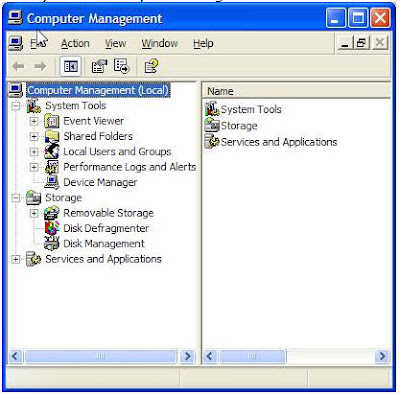
2). Click On Run,Then Type compmgmt.msc And Then Click Ok..A Computer Management Window Will Open.

3). Click On Disk Management.Then A Disk Management Window Will Appear At Right
                          http://techwarlock.blogspot.in/2012/07/fix-pendrive-not-showing-in-my-computer.html
4).On this disk management window, you can see some drives including the portable drive Or Pendrive. Right click on your Pendrive and click change drive letter and paths. A Small Window Will Appear.

5). Now Click On Change And Assign A New Drive Letter To Your Pendrive Which Is Not Used By Any Of Your Hard disk drives.

6). After assigning the new drive letter your Pendrive will show up in my computer with other drives.If Not Then Reboot Your Computer..
Read more ...

How To Compile And Run C/C++ Programs On Android

Before The Official Launch of Android Phones In India,Somebody Said me that "Android Phones Are The Future of Mobile Phone Computing..They Will Take Mobile Computing To New Heights...".

Google play(Android market) also plays a important role to provide them the capability to act like Super Computer. :)

If you are using android smart phone then you Probably know that what Crucial tasks a simple android phone can perform And Everything is just because of Google Play. :)
Now a days Developer are busy in developing system applications for android to provide it functionality like a Computer. One Of the Handy Android System Application Is C4droid.

First Of All What Is C4droid..?


C4droid is a C/C++ compiler for Android.
C4droid already has almost full C language support.
                                   http://techwarlock.blogspot.in/2012/07/know-how-to-compile-and-run-cc-programs.html
Now You write your own applications on Android phone, and run them. This app uses TCC and uClibc, so it has full support of ANSI C and some support of ISO C99.

So lets Start..
1). First Of All Go To Google Play And Search For A Application Named "C4droid".

2). Download That Application And Install It On Your Android Phone.

3). Open C4droid. Now A Text Editor Will Appear In Front Of You..Write your C or C++ Code There.

4). After That You Can Able To Compile Or Run Your Code in it.. :)

Done!!!

C4droid Have also Many More Features Like Syntax highlighting,Compiler Selection
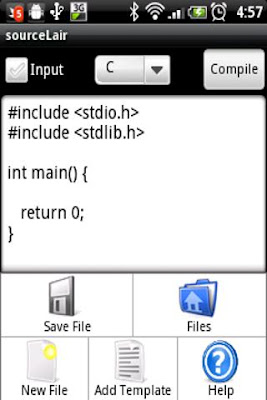
You Can Also Able To Supply Arguments For Your Program By just Leaving A blank Space Between Two Arguments.If you Don't Like C4droid then SouceLair Is another alternative to this.

You Can Download Source Lair By Searching "SourceLair" On Google Play(Android Market).
                                  http://techwarlock.blogspot.in/2012/07/know-how-to-compile-and-run-cc-programs.html
Source Lair Can Compile and run your C, C++, Objective-C, FORTRAN and Pascal programs right on your phone with their Cloud Based Compiler.
If You are going to Use Source Lair To Compile And Run Your Programs,Then Remember it Needs A Internet Facility On Your Phone To Interact With Their Cloud Based Compiler Server.
Read more ...

How To Recover Deleted Sms From Nokia Java Based Phones

                                    
So Here's The Trick..

1). First Download And Install A Nokia Pc Suite For Your Mobile Phone.
You Can Download It From Here.
http://www.nokia.com/in-en/support/downloads/

2). Connect Your Mobile Phone With Pc Suite.

3). Now Create A backup For Your Mobile Contents On Your Hard disk.

4). It Will Create A Huge Number Of .dat Files On Specified Directory.

5). Download And Install Software Named "Cygwin" From Here.
http://www.cygwin.com/
Cygwin Is A software Which Gives A linux Environment On Windows.

6). Open Cygwin And Open Your Backup Directory by Using Cd Command.
Syntax for that command Is..
Cd "full path to your specified directory". (without Quotes)

7). Then After Type "ls -al | less" without Quotes And Press Enter.
You Will See Something Like This.

total 0016
drwx------+ 2 Administrator Aks      0 Feb  6 01:35 .
drwx------+ 7 Administrator Aks      0 Feb  5 23:00 ..
-rwx------+ 1 Administrator Aks   2972 Nov 27  2003 1.dat
-rwx------+ 1 Administrator Aks  22913 Nov 27  2003 10.dat

8). Now Choose A File To Examine.

For i.e Type "strings 3102.dat | less" where 3102.dat is a file name for which you want to examine.
And Press Enter.
You Will See Some Part Of the Deleted SMS Like.

Hello How Are Yo

9). Now Just Search For The Matching Text By Using Grep Command...Now Type grep -i "Hello How Are Yo"
And Press Enter
you Will See Something Like This..

Binary file 1770.dat matches
Binary file 3102.dat matches

"3102.dat is The file That We are Examining and 1770.dat is the File That Contains the Complete SMS"

10). Now Type "strings 1770.dat" where 1770.dat is Your File Name.
And Press Enter

Done..)))
Read more ...

Trick To Reset Memory Card Password

                                     
If anyone Set A password In Memory Card Then It Is Not Easily Recoverable.. Even It doesn't Remove After Formatting.
off-course many of Online tools and software claims that they can able to Reset Memory Card Password..But They Are Only a Waste Of time And Money..

But Friends There Is a Possible Way By Which You Can Able To Reset Memory Card Password.. I tried This Method And Works Fine For Me.

So Lets Start..
1). If You Are Using A Java Based Or Any Other Phone Then First Of all You Have To Insert Your Memory Card In To A Symbian Phone to Reset Memory Card Password..if You don't have any Symbian Phone..Contact With Your Friends You will Find it Easily..

2). After That Go To This Downloading Link And Download X-plore.. X-plore is a free symbian File Manager Utility.

3). Then Install X-plore On Your Symbian Mobile.

4). Open X-plore And Press 0 "To Show System Files".

5). After That Go To The Following Path C:/SYS/DATA/MMCSTORE with X-plore.

6). Press 3 under Options To Set It in Hex Viwer.

7). In Third Column You Will See A Line Of Code Like This... TMSD02G (c??”?x???8?2?1?2?6)

Check The Character Between '?'
Bingo Its Your Password..i.e  8216 :))
Now Reset Memory Card Password by entering this password.

Read more ...